Horse Anatomy: Equine 3D
Real BodyworkMedical
3.025.00 Reviews
- Version
- 2.15
- Installs
- 10.00K
- Age Rating
- Everyone
Screenshots
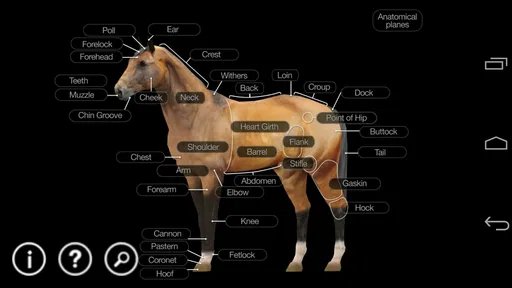
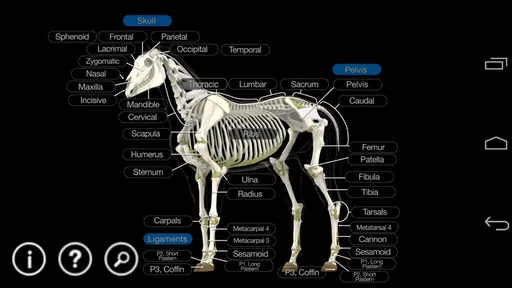
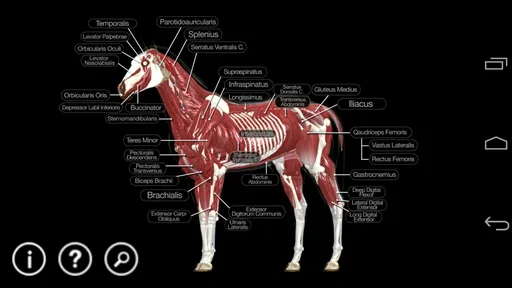
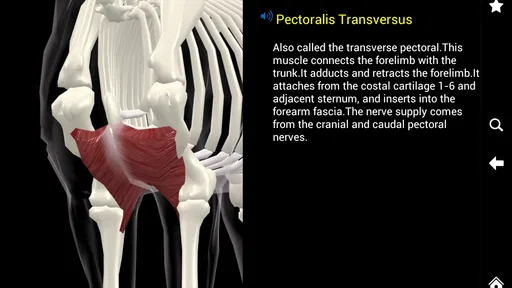
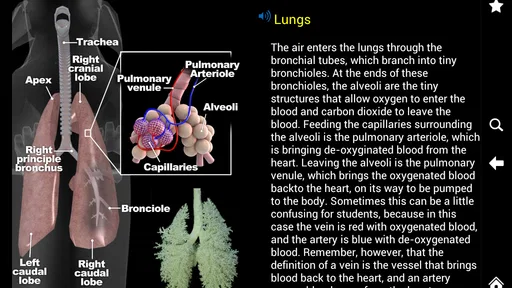
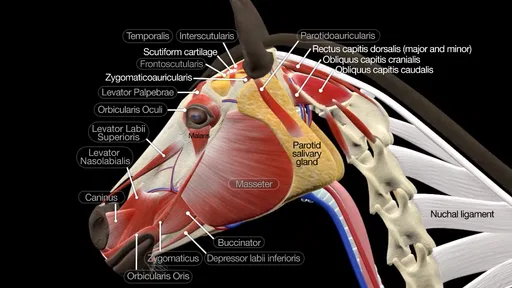
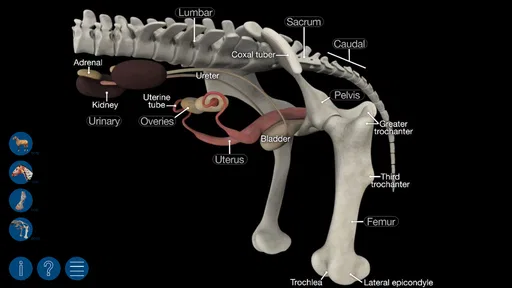
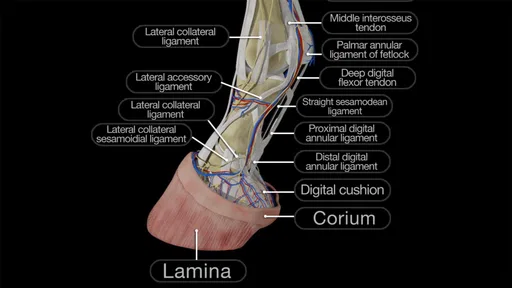
Our Review of Horse Anatomy: Equine 3D
 Analysis by Appyee
I approached Horse Anatomy: Equine 3D as a study tool rather than something to browse casually. It is a medical reference app from Real Bodywork, focused specifically on the horse’s body and built around a three-dimensional model. The central promise is useful: instead of trying to understand anatomy from a flat illustration, I can inspect structures spatially and connect one part to the next.
That makes it relevant to veterinary students, equine professionals, horse owners who want a more informed understanding of anatomy, and anyone who learns better by rotating a model than by memorizing labeled diagrams. It is also a paid app at $6.99, so the question is not whether it looks interesting for a few minutes. The real question is whether the interactive reference earns a permanent place in a study routine.
My overall impression is positive but specific. This is best treated as a visual companion for learning and revision, not as a replacement for formal veterinary instruction, a diagnostic resource, or a complete clinical library. Its strength is the way a three-dimensional view can make relationships between structures easier to grasp. Its weakness is that an interactive model still depends on the quality of the learner’s questions. If I do not already have a study goal, I can rotate the horse without making much progress.
From an anatomy question to a useful study session
I find that the most useful way to approach a visual anatomy reference is to turn curiosity into one answerable question: choose a region, predict what lies around it, and then check that idea from another angle. That small habit keeps a session focused and makes the model serve active recall rather than passive browsing. From there, the next section looks at how to shape that question into a practical study session.
Starting with the right problem
The app works best when I begin with a concrete question. For example, I might want to understand where a muscle sits in relation to nearby bones, review a region before handling a horse, or check my memory after reading a lesson. Starting with “I want to explore the horse” is less effective because the model offers too many possible directions. Starting with “I need to identify this structure and understand what surrounds it” gives the session a clear purpose.
This distinction matters because the app is a reference, not a guided course. The store summary describes more than 300 structures and a quiz function, which gives it meaningful breadth, but breadth does not automatically create a lesson plan. I found it more productive to choose one body region or one group of related structures, study it, and then test myself rather than jumping randomly between labels.
For a beginner, the first session should be about orientation. I would spend a little time learning how the model responds to touch, how to change the view, and how to recognize the major landmarks before attempting detailed recall. A new user who immediately searches for small structures may understand the label but lose the larger map of the horse’s body.
Building a mental map with the model
The three-dimensional presentation is most valuable when I use it to compare layers and relationships. A flat picture can show a muscle clearly, but it may not make its depth or neighboring structures intuitive. With a rotatable model, I can approach the same area from different angles and ask a more useful question: what would I expect to see in front of, behind, above, or below this structure?
That is a stronger workflow than simply reading names. I first look at the whole region, then isolate my attention on the target structure, and finally rotate back to the broader view. Returning to the full body is important because detailed anatomy can become disconnected from the actual shape and proportions of a horse.
I also recommend saying the structure’s name aloud or writing it down before checking the label. The visual model encourages recognition, but recognition is easier than recall. The quiz function becomes more useful after this deliberate pause. If I look at the answer first every time, the app can feel reassuring without showing whether I truly remember the material.
Using the quiz as an outcome check
The quiz is not merely an extra button for variety. It changes the app from a passive atlas into a basic study loop: inspect, predict, verify, and revisit. I would use it at the end of a short session rather than at the beginning, because an early wrong answer may only show that I have not oriented myself yet.
A practical method is to keep a small list of structures that caused hesitation. After the quiz, I return to those areas and inspect them from at least two viewpoints. This turns mistakes into targeted review. It also prevents a common problem with anatomy apps: spending equal time on familiar structures and difficult ones.
The quiz should still be understood as a check of identification, not a full test of anatomical competence. Knowing where a structure is does not automatically mean knowing its function, clinical relevance, movement, or variation. For those topics, I would pair the app with course notes, a textbook, or instruction from a qualified professional.
A realistic everyday scenario
Imagine I am preparing for a practical lesson about the horse’s limbs. Before the lesson, I open the model with one narrow goal: review the structures around a particular region. I first inspect the external landmarks, then work inward through the relevant anatomy, rotating the model to understand how the parts sit together. I use the quiz to identify what I can recall without help, note the structures I confuse, and revisit only those areas.
After the lesson, the same app can support the handoff from real-world observation back to study. If I saw a structure referenced by an instructor but could not picture it clearly, I can return to the model while the memory is still fresh. The app does not replace the lesson or provide the hands-on context, but it can help convert a fleeting explanation into a spatial reference I can revisit.
Where the handoffs need care
The most important handoff is between the app and professional education. A student may use the model to prepare for class, then use class material to add function and clinical meaning. A horse owner may use it to understand terminology before speaking with a veterinarian, then rely on that veterinarian for interpretation. In both cases, the app is useful because it improves vocabulary and orientation, not because it authorizes independent diagnosis.
Another handoff is between visual study and physical handling. A model can show where a structure is represented, but it cannot reproduce the experience of locating landmarks on a living horse. I would avoid treating the screen as a substitute for supervised palpation or examination. The safest benefit is better preparation: I arrive with a clearer mental map and better questions.
There is also a handoff between the app and other reference materials. If I need detailed explanations, clinical signs, treatment guidance, or a structured curriculum, I would move to a specialist textbook, a course platform, or advice from a qualified practitioner. The app’s role is narrower and more visual, which is precisely why it can complement those sources without replacing them.
What the finished result looks like
A successful session leaves me with more than a list of labels. I should be able to point to a region mentally, describe how the main structures relate to one another, and recognize the same area from more than one angle. That is the real outcome the app can deliver: a stronger spatial framework for further study.
For revision, this is particularly convenient. I can use a short session to refresh a region instead of reopening a large book and searching through several pages. The interactive view also gives me a way to challenge assumptions. If I think I know where a structure lies, rotating the model can reveal that my understanding was based on a single illustration angle.
The app’s audience is reflected in its broad Everyone age rating, but that does not mean every user will find it equally accessible. A complete beginner may need outside explanations for terminology, while an advanced learner may want more clinical depth than a visual reference supplies. It sits comfortably between a simple educational illustration and a full professional reference library.
Where the workflow breaks
The first friction point is the learning curve of interactive anatomy itself. A model can be more informative than a picture, but it can also be less immediately readable. If labels, layers, or controls are not used methodically, I can lose track of orientation. I found that taking a moment to establish the horse’s front, rear, upper, and lower directions prevents confusion later.
The second limitation is scope. More than 300 structures is substantial for a focused reference, yet it should not be mistaken for an all-purpose veterinary resource. The app is not the right choice if I need comprehensive disease information, treatment instructions, case management, or a guided qualification program. In those situations, a professional source is the better tool.
The third issue is the risk of false confidence. A quiz score can feel like proof of mastery, even when I have only memorized the appearance of a model. To avoid that trap, I would close the app and explain the region in my own words, then compare that explanation with trusted educational material. If I cannot describe the relationship without looking, I need more study.
There is also a practical trade-off in choosing a paid specialist app. The $6.99 purchase makes more sense for someone who expects repeated use than for a curious user who only wants a quick look at horse anatomy. Before buying, I would ask whether I have a genuine recurring need: coursework, professional preparation, teaching, or structured personal learning. Occasional curiosity may be better served by a general educational resource.
Who should use it, and who should skip it
I would recommend it to learners who benefit from visual and spatial explanations, especially those studying equine anatomy and wanting a compact reference for review. It can also help horse owners understand conversations with professionals, provided they keep the app in its proper role. The quiz makes it more valuable for repeated study than a static image alone.
I would be more cautious about recommending it to someone looking for immediate medical answers about a horse. The app can help identify anatomy, but anatomy alone does not explain why an animal is lame, painful, or behaving differently. A veterinarian remains the appropriate source for examination and diagnosis.
Advanced users should also consider whether a focused visual model is enough for their level. If their work requires extensive clinical detail, research references, or a formal progression through anatomy and physiology, they will likely need additional resources. This app is strongest as a visual layer within that larger system.
Platform details and long-term value
The app was released on December 5, 2013, and its current version is 2.15. It supports Android devices running at least Android 4.1. Those details suggest a product with a long presence rather than a newly launched experiment, but I would still judge it by how well its interface fits my device and study habits.
Its average rating is 3.0 from around 142 ratings, with around 25 written reviews, and it has passed 10K+ installs. I read that as a sign of a niche tool with a modest audience, not as a reason to dismiss it. Specialist educational apps often serve a narrower group than entertainment apps. The rating does, however, reinforce my advice to approach it with realistic expectations: useful visual reference, limited substitute for a complete learning system.
Real Bodywork’s focused approach is one of the app’s defining advantages. A general anatomy app may cover humans, broad biology, or many species without giving the horse enough attention. A textbook offers richer explanations but is slower to consult when I need to rotate a region and check a spatial relationship. This app occupies the middle ground: quicker and more visual than a book, but less comprehensive than a serious reference collection.
My recommendation after following the full workflow
I would use Horse Anatomy: Equine 3D as a repeatable preparation and revision tool. I would begin with a specific question, orient myself with the whole model, inspect one region from several angles, test recall with the quiz, and then hand unresolved questions to a textbook, instructor, or veterinarian. That workflow produces a clear result without asking the app to do something it was not designed to do.
The purchase is easiest to justify when the app will be opened regularly. Students can use it before and after lessons, instructors may find it useful for visual explanation, and committed horse owners can build enough anatomical vocabulary to follow professional discussions more confidently. Casual users may find the price harder to justify, especially if they do not have a defined study goal.
My honest conclusion is that this is a specialized tool with a worthwhile central idea and some clear boundaries. The three-dimensional model and quiz give anatomy study more interaction than a static diagram, while the focused equine subject keeps the experience relevant. Its best result comes from pairing visual exploration with disciplined recall and trusted instruction. If that is how you plan to use it, it is a sensible addition to an equine learning workflow; if you need diagnosis, treatment guidance, or a complete course, choose a more comprehensive source instead.
Verdict
Strengths of Horse Anatomy: Equine 3D
- Detailed 3D models make anatomical structures easier to visualize.
- Helpful reference for veterinary students and equine professionals.
- Interactive rotation and zoom support closer examination.
- Covers multiple body systems in one convenient mobile app.
- Useful for studying away from classrooms or reference books.
Limitations of Horse Anatomy: Equine 3D
- Some advanced content may require an in-app purchase.
- Large 3D assets can use considerable storage space.
- Navigation may take time to learn for first-time users.
- Not a substitute for textbooks, courses, or veterinary guidance.
- Older devices may experience slower loading or reduced performance.
Other Releases by Real Bodywork
View All
Muscle Trigger Point Anatomy
Medical4.7
Similar Picks in This Category
View All
WebMD: Symptom Checker
WebMD, LLC4.1

Microphone Amplifier
DOSA Apps4.2

Anatomy Learning - 3D Anatomy
3D Medical OU4.5

Period Tracker and Calendar
SimpleInnovation4.9

GoodRx: Prescription Coupons
GoodRx4.8

CVS Health
CVS Pharmacy4.5
Frequently Asked Questions
What is Horse Anatomy: Equine 3D?
Horse Anatomy: Equine 3D is an educational reference app that presents the anatomy of a horse through interactive three-dimensional models. It is designed to help users explore major body systems, bones, muscles, organs, and anatomical structures from different angles. The app can be useful for veterinary students, equine professionals, horse owners, riders, and anyone interested in learning how a horse’s body is organized.
Who can benefit from using Horse Anatomy: Equine 3D?
The app is primarily suited to veterinary and animal-science students, equine therapists, trainers, breeders, and horse owners who want a clearer visual understanding of equine anatomy. Beginners may also find it helpful because the 3D presentation is easier to follow than a traditional textbook illustration. However, it should be treated as a learning aid rather than a replacement for formal veterinary education or professional medical advice.
What features does Horse Anatomy: Equine 3D include?
Horse Anatomy: Equine 3D focuses on interactive exploration, allowing users to rotate, zoom, and inspect a virtual horse model. Depending on the section being viewed, users can isolate or examine anatomical layers and identify structures such as the skeleton, muscles, organs, and other body systems. Labels and explanatory information make it easier to connect the visual model with anatomical terminology and basic educational concepts.
Does Horse Anatomy: Equine 3D work without an internet connection?
Offline availability may depend on the app version, device, and whether all required educational models or media have been downloaded. It is recommended to open the application after installation and check which sections are accessible without a connection. An internet connection may still be needed for the initial download, updates, advertisements, account services, or additional content. Users should also ensure they have enough storage space for 3D assets.
Is Horse Anatomy: Equine 3D suitable for diagnosing a horse’s health problems?
No. Horse Anatomy: Equine 3D is an educational visualization tool and should not be used to diagnose injuries, illnesses, lameness, or other health conditions. Anatomical models can help users understand where structures are located, but they cannot replace a physical examination, diagnostic imaging, or professional veterinary judgment. If a horse shows pain, swelling, unusual movement, breathing problems, or behavioral changes, contact a qualified veterinarian promptly.
